Free SOP Cover Page
Three SOP cover page styles — download or copy in seconds.
Part of our free sop templates.
Your download has started.
Didn’t start? Retry the Word file or get the PDF.
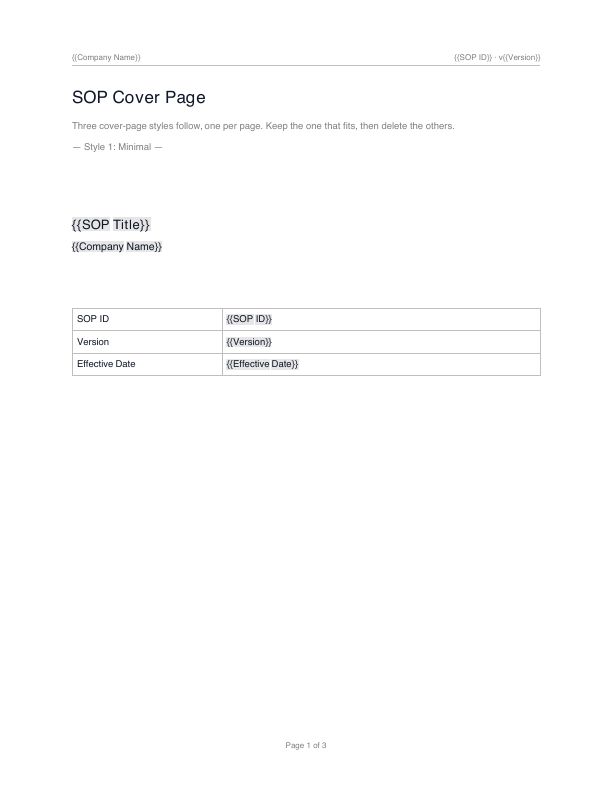
Three cover-page styles follow, one per page. Keep the one that fits, then delete the others.
— Style 1: Minimal —
{{SOP Title}}
{{Company Name}}
| SOP ID | {{SOP ID}} |
|---|---|
| Version | {{Version}} |
| Effective Date | {{Effective Date}} |
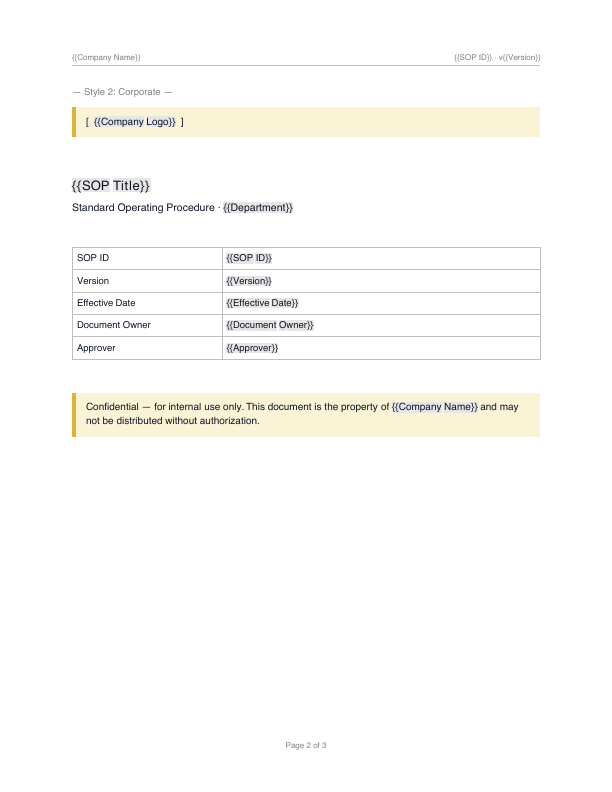
— Style 2: Corporate —
{{SOP Title}}
Standard Operating Procedure · {{Department}}
| SOP ID | {{SOP ID}} |
|---|---|
| Version | {{Version}} |
| Effective Date | {{Effective Date}} |
| Document Owner | {{Document Owner}} |
| Approver | {{Approver}} |
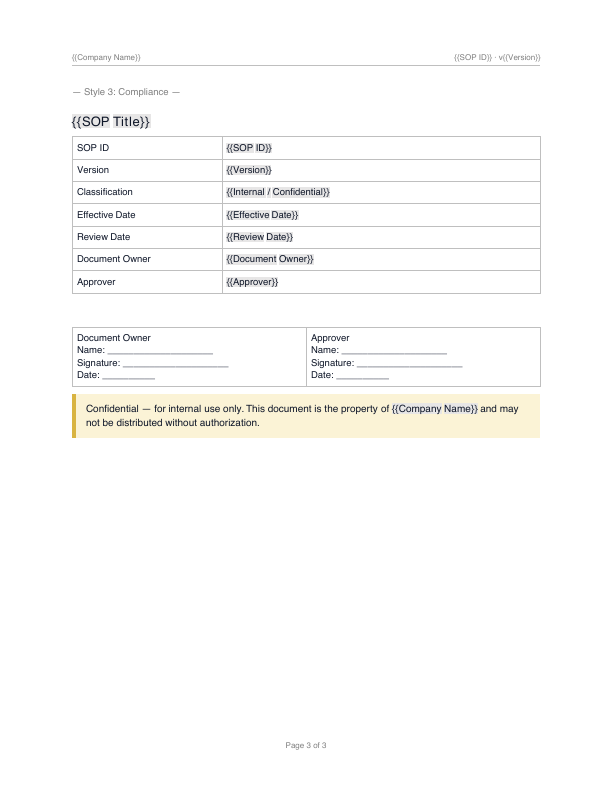
— Style 3: Compliance —
{{SOP Title}}
| SOP ID | {{SOP ID}} |
|---|---|
| Version | {{Version}} |
| Classification | {{Internal / Confidential}} |
| Effective Date | {{Effective Date}} |
| Review Date | {{Review Date}} |
| Document Owner | {{Document Owner}} |
| Approver | {{Approver}} |
The three cover styles filled in for one example document.
The same three styles, filled in for one document.
— Style 1: Minimal —
Kitchen SOP Manual
Acme Foods
| SOP ID | FB-000 |
|---|---|
| Version | 2.1 |
| Effective Date | June 1, 2026 |
— Style 2: Corporate —
Kitchen SOP Manual
Standard Operating Procedure · Food & Beverage
| SOP ID | FB-000 |
|---|---|
| Version | 2.1 |
| Effective Date | June 1, 2026 |
| Document Owner | Kitchen Manager |
| Approver | General Manager |
— Style 3: Compliance —
Kitchen SOP Manual
| SOP ID | FB-000 |
|---|---|
| Version | 2.1 |
| Classification | Confidential |
| Effective Date | June 1, 2026 |
| Review Date | December 1, 2026 |
| Document Owner | Kitchen Manager |
| Approver | General Manager |
What the downloaded pages look like
Each image is one page of the PDF download above, rendered from that file when the site was built — the three cover styles, one per page. Click a page to download the PDF.
What goes on an SOP cover page
An SOP cover page is the title page that makes a procedure’s identity and approval status obvious before anyone reads it. In a document-controlled environment it carries the control block — the fields an auditor looks for first.
All three styles in this template include the same core elements, so you can pick a look without losing any required field.
- Document title and SOP ID
- Company name or logo
- Version number and effective date
- Review or next-revision date
- Document owner and approver
- Confidentiality or classification note
Which style to use, and when you need a cover page
Use the Minimal style for internal, low-formality SOPs; Corporate when you want your logo and branding on the front; and Compliance for regulated or audited documents that need a classification line and a signed approval block.
You do not always need a separate cover page — for a short internal SOP, the title block on page one can be enough. A cover page earns its place once a document is version-controlled, approved, and shared beyond the immediate team.
How it works
- Preview the three cover-page styles, each on its own page.
- Download Word/PDF, or copy the text to paste into Google Docs.
- Keep the style you like, fill in the title and document control, and delete the others.
Frequently asked questions
What goes on an SOP cover page?
An SOP cover page usually shows the document title, the company name or logo, the SOP ID and version, the effective and review dates, the document owner and approver, and a confidentiality note. All three styles in this template include those elements.
Which cover page style should I use?
Use Minimal for internal, low-formality SOPs; Corporate when you want your logo and branding; and Compliance for regulated or audited documents that need a classification and signed approval block.
Do I need a cover page on an SOP?
Not always, but a cover page helps in document-controlled environments by making the title, version, and approval status obvious at a glance. For a short internal SOP, the title block on page one may be enough.